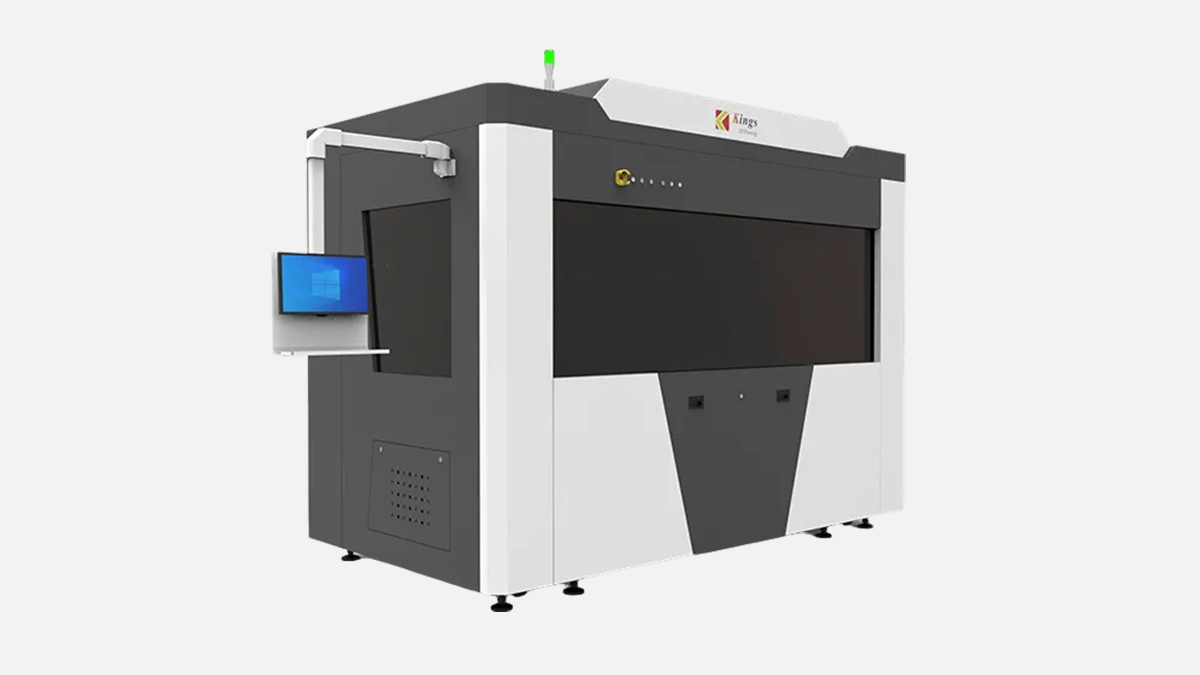
Large-format SLA system with 2700 × 900 × 800 mm build for one-piece patterns, tooling masters, and fit-check models.
Kings SLA 2700 Pro is a large-format stereolithography machine built for full-size prototypes, pattern work, and tooling models that are simply too big for common resin systems. The key point is the build envelope: 2700 × 900 × 800 mm. In a metalworking business, that size is not a “nice to have”, it changes what you can do in one piece instead of splitting, pinning, and losing geometry.
This model is published as a three-laser configuration, and Kings positions it for industrial applications where stability and repeatability matter on long builds. Kings also specifies a marble-based structure for the recoater frame, elevator holder, and scanning system base, which is a typical approach on large resin systems to keep motion stable under high mass and long travel.
Before you think about applications, you need to look at what the machine actually asks from your workshop and what it can physically deliver. The table below is pulled from the manufacturer technical data for this model, and I am keeping the values exactly as stated so your engineering team can cross-check them during procurement.
| Parameter | Value (as published) |
|---|---|
| Max printing size | 2700 × 900 × 800 mm |
| Machine size | 351 cm (W) × 196 cm (D) × 273 cm (H) |
| Machine weight | 3750 kg |
| First tank resin | 2650 kg |
| Rated power consumption | 3.0 kVA |
| Electrical requirement | 200 to 240 VAC, 50/60 Hz, single-phase, 10 A |
| Max scanning speed | 15.0 m/s |
| Beam size | 0.08 to 0.8 mm variable beam |
| Layer thickness | 0.05 to 0.2 mm |
| Accuracy | ±0.15 mm (L ≤ 100 mm), ±0.15% × L (L > 100 mm) |
| Repeat positioning accuracy | ±0.01 mm |
| Wavelength | 355 nm |
| Ambient temperature | 20 to 26°C ( 72 to 79°F ) |
| Relative humidity | < 40%, non-condensing |
| File formats | STL, SLC |
| Network | Ethernet, TCP/IP |
| Operating system | Windows 10 |
| Warranty | 2 years (including laser) |
What this table tells a UAE workshop owner in plain terms is simple. This is a heavy machine at 3750 kg, and it is not going to “fit anywhere”. You plan access, floor bearing capacity, and material handling from day one. And because it is a resin system with an initial fill stated as 2650 kg, the resin logistics are not a side topic, they are part of your operating model.
When metalworking people hear “resin printer”, the first reaction is often “prototype toys”. That is not what a machine with 2700 mm length is about. In production environments, the value comes from geometry, lead time, and fit-checking.
Here are the most common metalworking-adjacent jobs where a machine like this becomes practical, especially in UAE where many shops handle both machining and fabrication under one roof. The list is not theory, it is the set of use cases where large resin builds remove weeks of iterative cutting and welding in early phases.
The main takeaway is that the 2700 × 900 × 800 mm envelope allows you to build a single reference part, then measure, scan, and adjust. For many shops, that is the difference between “first article looks close” and “first article matches CAD”.
On a machine this size, build strategy is as important as machine specs. The Z height of 800 mm gives you real room for tall parts, but it also increases risk if you treat the build like a small desktop job.
Two operational points matter here.
First, you will often save more time by printing one-piece reference geometry than by printing the final thick part. Many metal shops print a thin-walled “skin” or gauge model, verify interfaces, then proceed with machining or fabrication.
Second, you need to plan lifting and handling of big resin parts. A large part can be light compared to steel, but it is still awkward and can deform if supported poorly during post-processing.
This is why you should treat the machine size 351 cm × 196 cm × 273 cm as part of the production cell, not a standalone machine. You need working space for loading, cleaning, draining, and safe movement.
Kings specifies a max scanning speed of 15.0 m/s, plus a variable beam system 0.08 to 0.8 mm, and layer thickness 0.05 to 0.2 mm. These three numbers define how you trade detail versus time.
If your goal is a full-size pattern that will be sanded and sealed, you typically do not need the smallest beam and thinnest layer. If your goal is a fit-critical assembly mockup with fine interfaces, then you choose smaller beam and thinner layers, accepting longer cycle time.
Kings also mentions differentiated parameters for upskin and downskin, plus parameter databases for different layer thicknesses. Practically, this matters because a large part needs both surface quality and stable bulk behavior. Your team will tune settings for “skin” and “core” so you are not wasting time running fine settings through the entire volume.
Below is a practical way to think about settings selection in a metalworking workflow. I am not giving magic recipes, because resin choice and geometry decide the final settings, but the logic stays the same.
After you pick the direction, you validate on a reduced section of the part first. On a machine with 2650 kg initial resin fill, trial discipline is not optional because every failed large build is expensive in labor and downtime, even if you ignore material cost.
Kings publishes accuracy as ±0.15 mm for lengths up to 100 mm, and ±0.15% × L for lengths above 100 mm. That format is normal for large machines, because error grows with distance.
For a metalworking buyer, the correct question is not “is it accurate”, it is “where do I need accuracy”.
If you are using the printer for visual prototypes and casting patterns, this accuracy level is usually acceptable, and your finishing process takes the final geometry. If you are using it for drill templates, assembly interfaces, or checking fixtures, you must design the workflow so critical references get verified and, if needed, corrected after printing.
Kings also lists repeat positioning accuracy ±0.01 mm and a vertical resolution ratio of 0.0005 mm. In practice, repeat positioning matters for motion consistency, while the vertical resolution ratio relates to Z motion control granularity. You still validate on your part geometry and resin behavior, but these numbers are relevant signals for a large-format system that needs stable long travel.
The practical advice is to set internal acceptance tests. Print a long flat reference strip, print a multi-hole gauge plate, and measure with the same tools your shop uses daily. On large resin machines, your real capability is the combination of mechanics, environment, and process control.
Surface quality on a large resin system depends on two main levers: layer thickness and beam size. Kings gives you layer thickness 0.05 to 0.2 mm and variable beam 0.08 to 0.8 mm.
For metalworking customers, surface is not about beauty. It is about downstream work.
If the printed part becomes a master for molding or vacuum forming, surface controls your sanding and sealing hours. If the printed part is only a checking model, surface can be rougher as long as geometry is stable.
Two operational habits help a lot:
After a large build, plan time for stabilization. Big resin parts can warp if post-cure and handling are rushed. This is not a marketing point, it is basic process control on large photopolymers.
Kings states first tank resin as 2650 kg. Whether your daily operating fill is exactly that number or lower, the message is clear: this is a high-volume resin system.
From an engineering manager point of view, resin management includes storage, filtration, cleanliness, and safety. It also includes supply continuity. A machine that can build 2700 mm long parts is typically used on deadlines, so you do not want downtime because resin delivery slipped.
Kings also specifies resin surface power ≥ 300 mW and wavelength 355 nm, which points to a UV laser process aligned with industrial SLA resin chemistry. When your shop compares resin options, you want to confirm mechanical properties after post-cure, heat behavior, and finishing compatibility for your exact use case.
For metalworking applications, the most common resin requirements are:
This is also where your procurement checklist must include post-processing equipment. A large resin printer without a planned cleaning and curing workflow becomes a bottleneck.
Kings lists electrical requirement 200 to 240 VAC, 50/60 Hz, single-phase, 10 A, and rated power consumption 3.0 kVA. In UAE, most industrial areas have solid power availability, but you still need a dedicated circuit and clean grounding because long builds do not like power interruptions.
Kings also lists ambient temperature 20 to 26°C and humidity < 40%, non-condensing. This is a very important line for UAE workshops because your production hall might be stable, but loading bays and open doors are not. Resin processes like stable temperature, and large builds amplify any drift.
Here is a simple site checklist that works well for UAE factories. I am listing it as actions you can actually assign, not as generic advice.
Once these basics are addressed, the rest of the integration becomes much easier, and your machine will spend time printing instead of waiting for facility fixes.
Kings states STL and SLC as input file formats, machine control software as Kings control software, operating system Windows 10, and networking over Ethernet TCP/IP.
For an engineering office, that means you can integrate the printer into an existing CAD to CAM style pipeline. The discipline is the same as with CNC, only the toolpath is a layer job.
Two practical points matter.
First, large files. A build envelope of 2700 mm usually means heavy meshes and big slice data. Your team should plan for clean CAD export, controlled tessellation, and file validation.
Second, traceability. If you use the printer for fixtures and patterns, you want job naming, revision control, and a simple sign-off process, the same way you treat CNC programs.
This is also where remote monitoring becomes valuable. Kings mentions remote monitoring capability, and on large builds, remote visibility can reduce night shift risk and shorten response time if something goes wrong.
Kings lists closed-loop motion control and galvo closed-loop for the variable beam system, plus an intelligent position vacuum recoating mode. On large SLA machines, recoating quality is one of the main causes of print failure on big flat sections, so the recoater design is not a small feature.
Kings also mentions a compensation algorithm for multi-head systems to support uniform curing across the range. With three lasers, alignment and energy uniformity matter, especially when you print a long part that spans most of the 2700 mm axis.
During acceptance, you should request a demonstration part that uses the full width and length, not a small sample. A small sample can hide multi-laser stitching effects, while a full-span print will show you how the machine behaves in real production.
If you are shopping in the large-format SLA segment, the realistic comparison set usually includes other industrial SLA platforms from well-known OEMs. I will keep this comparison limited to published, checkable data points that matter for factories: build envelope and facility power, plus a few process signals where numbers are available.
The table below compares Kings SLA 2700 Pro against commonly referenced industrial SLA machines. This is not to say one is “better”, it is to show where the Kings machine sits in terms of scale and shop integration.
| Model | Published build envelope | Published electrical requirement |
|---|---|---|
| Kings SLA 2700 Pro | 2700 × 900 × 800 mm | 200 to 240 VAC, 50/60 Hz, single-phase, 10 A |
| 3D Systems ProX 950 | 1500 × 750 × 550 mm | 220 to 240 VAC, 50/60 Hz, 50 A, single-phase |
| UnionTech RSPro 1400 | 1400 × 700 × 500 mm | Varies by configuration, confirm in their facility spec |
| UnionTech Lite 800 | 800 × 800 × 550 mm | 200 to 240 VAC, 50/60 Hz, single-phase |
Here is what the comparison means in practical terms.
Kings is in a different size class. A 2700 mm axis can cover parts that would require segmentation on a 1500 mm platform. If your work includes large patterns, long ducts, long fixtures, or full-size styling parts, the one-piece option is a direct reduction in assembly and rework.
On facility power, the published Kings requirement of 10 A single-phase is noticeably lighter than the published 50 A requirement for ProX 950 in the facility guide. That can matter in older workshops where you do not want a major electrical upgrade. Still, because Kings also lists 3.0 kVA, you should validate the real peak draw during acceptance and size your circuit with margin.
On process speed, Kings publishes max scanning speed 15.0 m/s. Some other platforms publish similar ranges depending on spot size and settings. The honest way to compare throughput is to run the same benchmark geometry at the same surface requirement, then compare total hours including post-processing. That is exactly how CNC buyers compare cycle time across different machines, and the same logic works here.
When a shop buys a CNC machine, you do not only buy the spindle. You buy tooling, workholding, coolant, power, and training. A large-format SLA machine is the same story.
Here are the checks that prevent surprises. Use this as a purchasing action list, not as marketing content.
If you do these steps, the decision becomes clear. Either the machine fits your production reality, or it does not.
Kings SLA 2700 Pro is a serious production tool when your parts are physically large and you want them in one piece. The main advantages come directly from the published parameters: a build envelope of 2700 × 900 × 800 mm, variable beam 0.08 to 0.8 mm, layer thickness 0.05 to 0.2 mm, and a three-laser architecture designed for large builds.
In my experience, this type of machine is typically bought by companies that do at least one of these jobs: large pattern work, tooling masters, full-scale prototypes, or repeatable checking models for fabrication and machining projects. If that is your profile, the value is not theoretical. It is fewer splits, fewer alignment problems, faster fit checks, and cleaner handover from design to production.