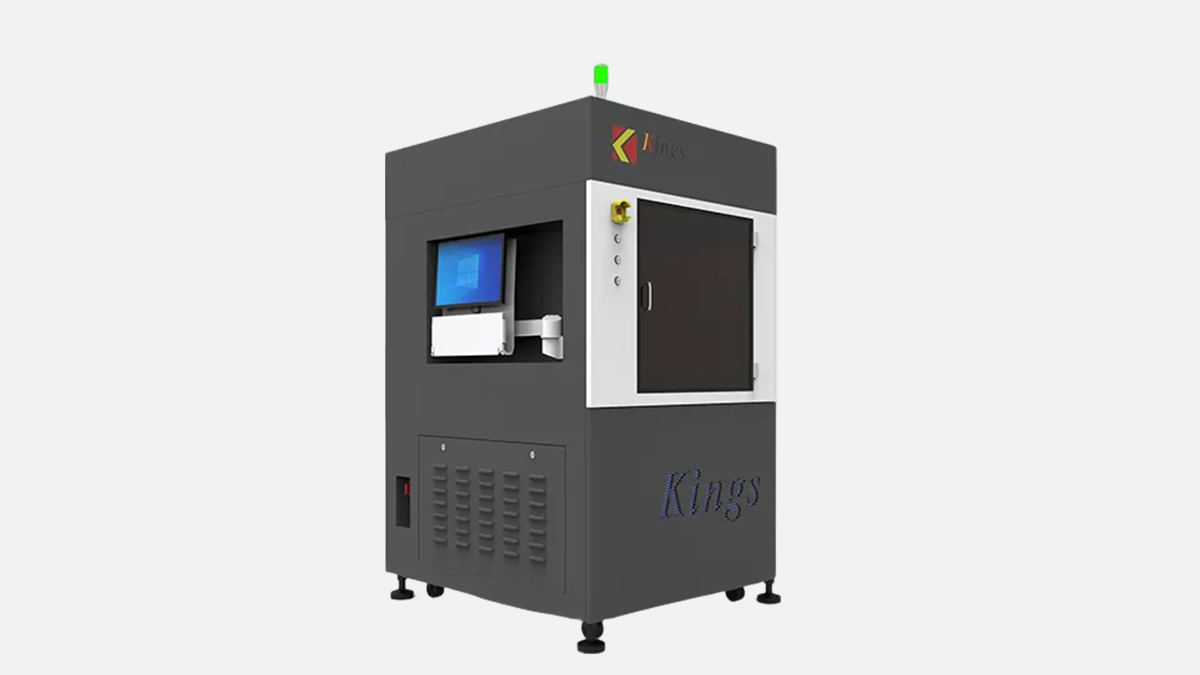
Industrial SLA resin printer with 600 x 600 x 400 mm build size and variable laser spot for detailed patterns and tooling.
The Kings SLA 600 Pro is an industrial UV laser stereolithography system built around a large working envelope and a fast scanning head. In a metalworking company, you do not buy it to replace machining, you buy it to remove waiting time for patterns, fixtures, gauges, and master models that would otherwise burn CNC hours.
What makes this specific model easy to position in a production workflow is the combination of build size, scan speed, and a laser spot that can be widened when the job is about volume rather than tiny cosmetic detail. On the Kings datasheet you will see the max printing size of 600 x 600 x 400 mm, max scanning speed of 15.0 m/s, and a variable beam size of 0.08 to 0.8 mm. Those three numbers explain most of the economics of this machine on a shop floor.
In practice, the Kings SLA 600 Pro tends to land in three kinds of businesses. The first is a machining and fabrication shop that needs prototypes and fit checks fast, often for automotive, aerospace, and general engineering work. The second is a tooling and molding supplier that needs clean surfaces and stable dimensions for masters and patterns. The third is a foundry related workflow where you print patterns, cores, or tooling aids, then finish critical faces on a mill.
The build envelope is the first thing your production manager will ask about, and here the Kings SLA 600 Pro is very direct. The usable printing size is 600 x 600 x 400 mm, which is big enough for single large patterns or a full tray of smaller components printed in one build. If you are used to desktop resin systems, this is a different class of machine, both in output and in logistics.
The second planning question is footprint and handling. The machine size is listed as 118 cm wide, 129 cm deep, and 217 cm high, with a machine weight of 990 kg. That is heavy enough that you should think like you are installing a small CNC, not a desktop printer. You will want a clear path for rigging, a stable floor, and a defined work zone around the machine for resin handling and part removal.
Before you commit space, walk the path from delivery door to final installation position and check every turn. Also check that you have room to open panels, remove the platform, and access the vat area comfortably. If you treat it like a CNC cell, the daily operation becomes calm and predictable instead of improvised.
Here is a practical way to think about layout around this model, based on its size and how resin systems are typically serviced:
With a disciplined layout, the Kings SLA 600 Pro becomes a reliable upstream process for machining rather than a messy corner activity. That matters in the UAE, where dust control and stable room conditions are part of daily production reality.
The Kings SLA 600 Pro uses a frequency tripled solid-state laser listed as Nd:YVO4, with a wavelength of 355 nm. This wavelength is a common industrial UV standard for SLA resin curing, and it aligns with the machine’s focus on precision surfaces and dimensional stability. The datasheet also specifies resin surface power of 300 mW or higher, which supports stable curing when parameters are set correctly.
The optical headline feature for this model is the variable beam. The specified beam diameter range is 0.08 to 0.8 mm measured at 1/e², and the beam system is described as galvo with closed-loop control. From a production point of view, this is not a marketing phrase. It is a real lever to control the trade between surface detail and throughput for a specific build.
To make that more concrete, the beam range changes how you schedule work on this model:
Kings also states in its brochure that the platform includes “Full marble structure for enhanced recoating and scanning stability,” and that key components include an Optowave laser and a Scanlab galvanometer. Those component choices are consistent with the machine’s focus on stable scanning and repeatable optical performance.
The important operational takeaway is simple. When the scanning and optics are stable, your operators spend less time chasing defects and more time producing predictable output. That is what your quality department will care about, even if they never touch the printer.
Large format SLA is won or lost in recoating. Kings specifies a “marble recoater frame, marble elevator holder and marble scanning system base” as the main structure, and the coating mode is described as “intelligent position vacuum recoating.” The same datasheet lists a vertical resolution ratio of 0.0005 mm and repeat positioning accuracy of ±0.01 mm, with a closed-loop motion control system.
Those details matter because the Kings SLA 600 Pro is designed to handle long builds where stability over time is more important than a single impressive short print. Vacuum recoating and closed-loop control are aimed at keeping resin level and layer formation consistent, especially when the job fills a large part of the vat.
When evaluating output consistency, focus on what affects the first layer, mid-build layers, and end-of-build layers. On big machines, it is common for problems to appear only after hours, so you want a system that is built for repeatable layer handling.
A disciplined operating routine helps you get the most from this model’s recoating approach:
If you set the cell up correctly, operators will see fewer random surface defects and fewer “mystery” failures late in the build. That stability is a practical advantage, especially for patterns that must match CAD so they can be machined, scanned, or assembled without surprise.
Kings publishes a clear accuracy statement for the SLA 600 Pro. It lists ±0.1 mm for dimensions up to 100 mm, and ±0.1% x L for dimensions above 100 mm. This is the type of spec that matters for metalworking support tasks, because it tells you whether the printed part can go straight into a fixture role or whether it is only a master that still needs machining.
For a machine shop, the smart approach is to treat printed resin as a near-net master, then machine the critical interfaces when needed. The printer gives you geometry, surface continuity, and speed. CNC gives you final tolerances on bores, datums, and sealing faces.
Here is how many shops successfully use this accuracy profile on real jobs:
This approach avoids disappointment. You are not asking the resin print to be a grinding machine. You are using it as a controlled, repeatable geometry generator upstream of machining and finishing. That is exactly where SLA 600 Pro class machines can pay back.
Kings specifies a layer thickness range of 0.05 to 0.2 mm for the SLA 600 Pro. The Kings 600/650 Pro brochure also references “different parameter database with different layer thickness” and automatic identification of upskin and downskin with differentiated parameters. That tells you the machine is meant to run with profiles that balance surface quality and speed for different surfaces of the same part.
On the shop floor, layer thickness is not just a visual choice. It changes lead time, post-processing effort, and how much sanding or machining you will need. For a metalworking business, the fastest win is usually to use fine layers only where the surface is functional or customer-facing.
A simple planning table helps operators make consistent choices without arguing every job. Below is a practical way to map the Kings range to typical manufacturing tasks.
| Layer thickness | Typical use on this model | What to expect |
|---|---|---|
| 0.05 mm | Master surfaces, detail features, tight cosmetic requirements | More time in the machine, less time sanding |
| 0.10 mm | General prototypes, fixtures, medium surface demand | Balanced build time and finishing |
| 0.20 mm | Large patterns with machining or coating planned afterward | Fast volume build, more finishing work |
Do not treat this table as a rulebook. Treat it as a starting point that you refine with your own resin choice and your own finishing standards. With a stable profile library, the Kings SLA 600 Pro becomes predictable, which is exactly what production likes.
Kings lists the machine control software as “KINGS 3D control software,” running on Windows 10, with input file formats STL and SLC. Network connectivity is specified as Ethernet with TCP/IP. These points matter because industrial printers are often integrated into engineering workflows where files move between CAD, CAM, and inspection systems.
From an engineering management point of view, the most important thing is to standardize file preparation and handoff. Your CNC department already understands revision control and job travelers. Apply the same discipline to printing and you will avoid printing the wrong revision or losing time to operator interpretation.
A typical clean workflow for this model looks like this:
Once the workflow is standardized, the Kings SLA 600 Pro acts like another production asset rather than an R&D toy. That is what helps it survive in a busy UAE job shop where priorities change daily.
Kings provides specific installation conditions for the SLA 600 Pro. Electrical requirement is 200 to 240 VAC, 50/60 Hz, single-phase, 10 A, and the rated power consumption is 1.5 kVA. Ambient temperature is specified as 20 to 26 C, and relative humidity is 40% or less, non-condensing.
These are friendly numbers for the UAE because single-phase power is widely available, and the voltage range matches typical industrial supply. The bigger challenge is climate control. In the Gulf, you can meet the temperature window easily with AC, but humidity control and dust control need attention depending on your facility.
Here are practical site setup points that align with the published requirements and the realities of resin handling:
If you respect the environment window, you will get more stable layer formation and more repeatable dimensions. If you ignore it, you can still get prints, but you will spend time troubleshooting results that change with the weather.
The Kings SLA 600 Pro is often most valuable when it shortens the path between CAD and a physical part that your team can touch. For metalworking businesses, the strongest use cases are not random prototypes. They are jobs that directly reduce CNC time, reduce rework, or reduce the risk of a wrong tooling decision.
Because the build size is 600 x 600 x 400 mm, you can print large masters for casting and forming, or you can batch smaller items for fixtures and inspection. The accuracy profile of ±0.1 mm up to 100 mm supports many practical shop tools when you design with reasonable tolerances.
Here are model-specific applications that regularly make sense for machining and fabrication operations:
The right mindset is to use this machine where it saves lead time and reduces uncertainty. If a printed master avoids one wrong machining setup or one wrong mold decision, it can pay for its time very quickly in a busy shop.
Kings lists a max scanning speed of 15.0 m/s, and the variable beam range extends up to 0.8 mm. Together, these allow you to plan builds for either detail or volume depending on the job. On large patterns, the ability to widen the beam and increase layer thickness can cut hours from a build without changing the downstream machining plan.
Throughput is not only about fast scanning. It is also about stable long runs, predictable finishing time, and a workflow that does not stall on cleaning and curing. This is where disciplined planning beats heroic operator effort.
A few practical scheduling habits help you get predictable output from this model:
When your team understands how scanning speed, beam size, and layer thickness interact, you can treat the SLA 600 Pro as a planned production step. That is when it becomes a real manufacturing tool rather than a device that only runs when someone has spare time.
If you are shopping this class of industrial SLA printer, you will see a few familiar names. Two common reference points are UnionTech RSPro600 2.0 and 3D Systems SLA 750. Comparing published specs helps you decide whether the Kings SLA 600 Pro fits your space and your part mix.
The table below uses published headline specifications to show where the Kings SLA 600 Pro sits in the market. It is not a full evaluation, but it highlights the differences that matter to production teams.
| Model | Build volume | Laser wavelength | Beam or spot size | Scanning speed |
|---|---|---|---|---|
| Kings SLA 600 Pro | 600 x 600 x 400 mm | 355 nm | 0.08 to 0.8 mm variable | 15.0 m/s max |
| UnionTech RSPro600 2.0 | 600 x 600 x 500 mm | 355 nm | 0.12 to 0.2 mm | 6 to 10 m/s |
| 3D Systems SLA 750 | 750 x 750 x 550 mm | 355 nm | Published as native resolution based system specs | Published as production platform |
What stands out for the Kings model is the wide beam range up to 0.8 mm and the published max scan speed of 15.0 m/s. This can be useful when you print big masters that will be coated or machined, because you can prioritize build time without losing the overall geometry. Where other systems may offer a taller Z envelope, the Kings build height is 400 mm, so very tall parts might push you toward a different model or a different build strategy.
Do not choose only on the table. Choose based on your part mix, your finishing process, and the space you can dedicate to a controlled resin cell. If your core need is large masters and production fixtures within a 600 x 600 mm class footprint, the Kings SLA 600 Pro is a serious candidate.
When you evaluate this machine for a UAE production environment, you want clear answers on installation, operating discipline, and support. The published specs give you confidence in capabilities, but the day-to-day success is about how the machine is run and maintained.
Before you sign anything, prepare a checklist and push for concrete, written answers. This avoids surprises after the machine is on your floor.
Use this checklist to keep the discussion focused:
If you treat the Kings SLA 600 Pro like a production asset with a controlled process, it can deliver consistent masters and tooling aids that reduce CNC load. If you treat it like a casual prototype tool, it will still print, but you will not get the stable output that justifies an industrial system.
The Kings SLA 600 Pro is strongest when your business needs large, accurate resin parts that support metalworking workflows. Its 600 x 600 x 400 mm build area fits many real masters and patterns, and the combination of 15.0 m/s scanning and 0.08 to 0.8 mm variable beam gives you flexibility across detail jobs and big-volume jobs. The closed-loop control, vacuum recoating approach, and marble structural elements are aimed at stability over long builds.
Shops typically choose this machine when they want to compress lead time on prototypes, patterns, and fixtures, and when they are ready to run a controlled resin cell with proper climate and handling discipline. In other words, it is bought by companies that want speed and predictability upstream of machining, casting, and finishing, not by companies looking for a hobby printer on the side.